Type it.
Then make it yours.
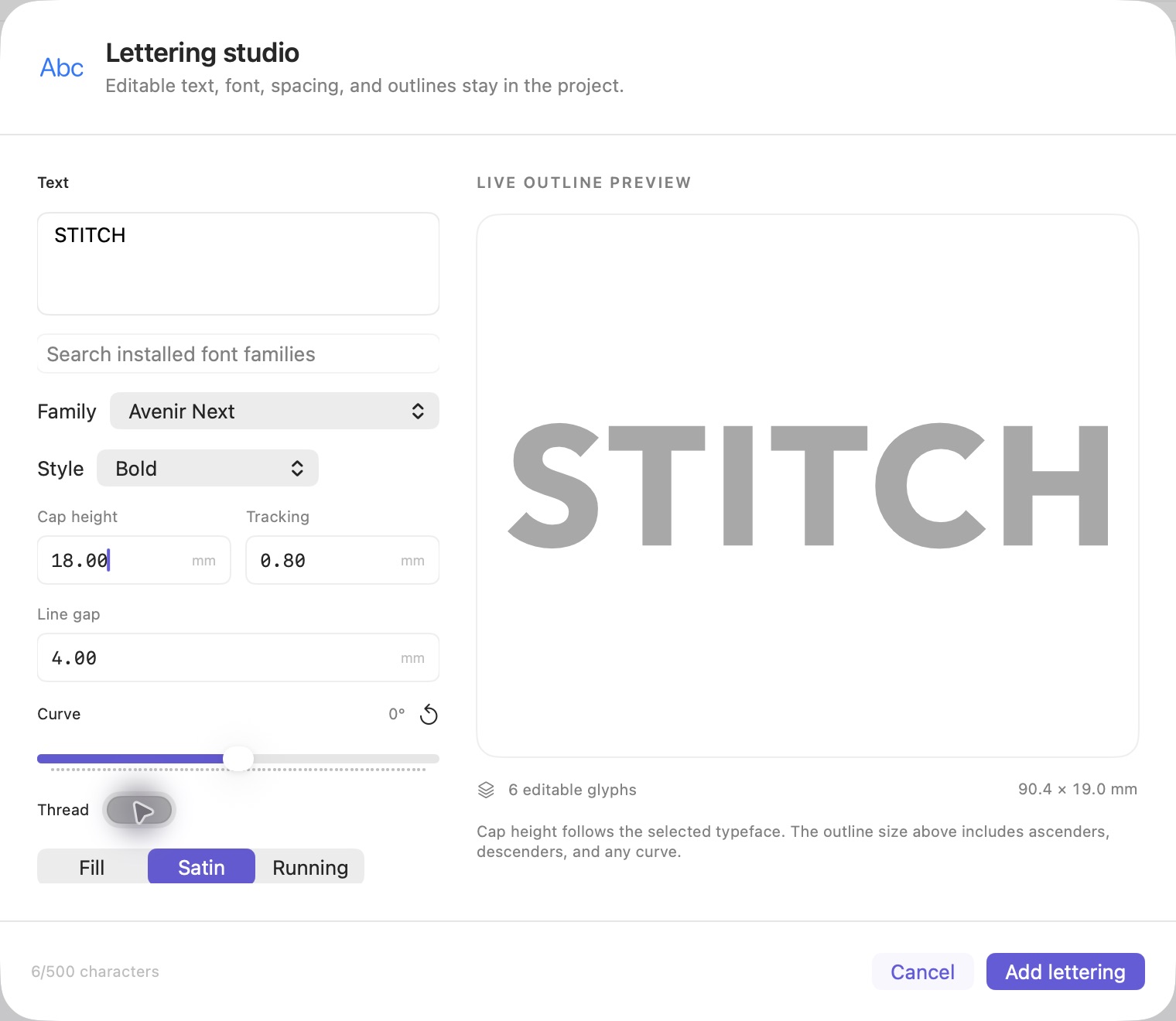
Find the right font, adjust the spacing, and shape the line. Preview your lettering before adding it to the canvas, then keep its recipe and individual glyphs editable.
STITCHISTRY STUDIO / MADE FOR MAC
Embroidery digitizing software, beautifully at home on Mac.
Turn PNG and JPG artwork into editable designs, refine every stitch, and export DST.
macOS 14+ · Apple Silicon Monthly or perpetual. Your choice.
CRAFT, WITHOUT THE COMPROMISE.
From an image to a considered stitch file.
Every curve, every letter, every detail.
YOUR WORKSPACE, REIMAGINED.
A calm workspace with precise control. Take a closer look at the tools that bring your design together.
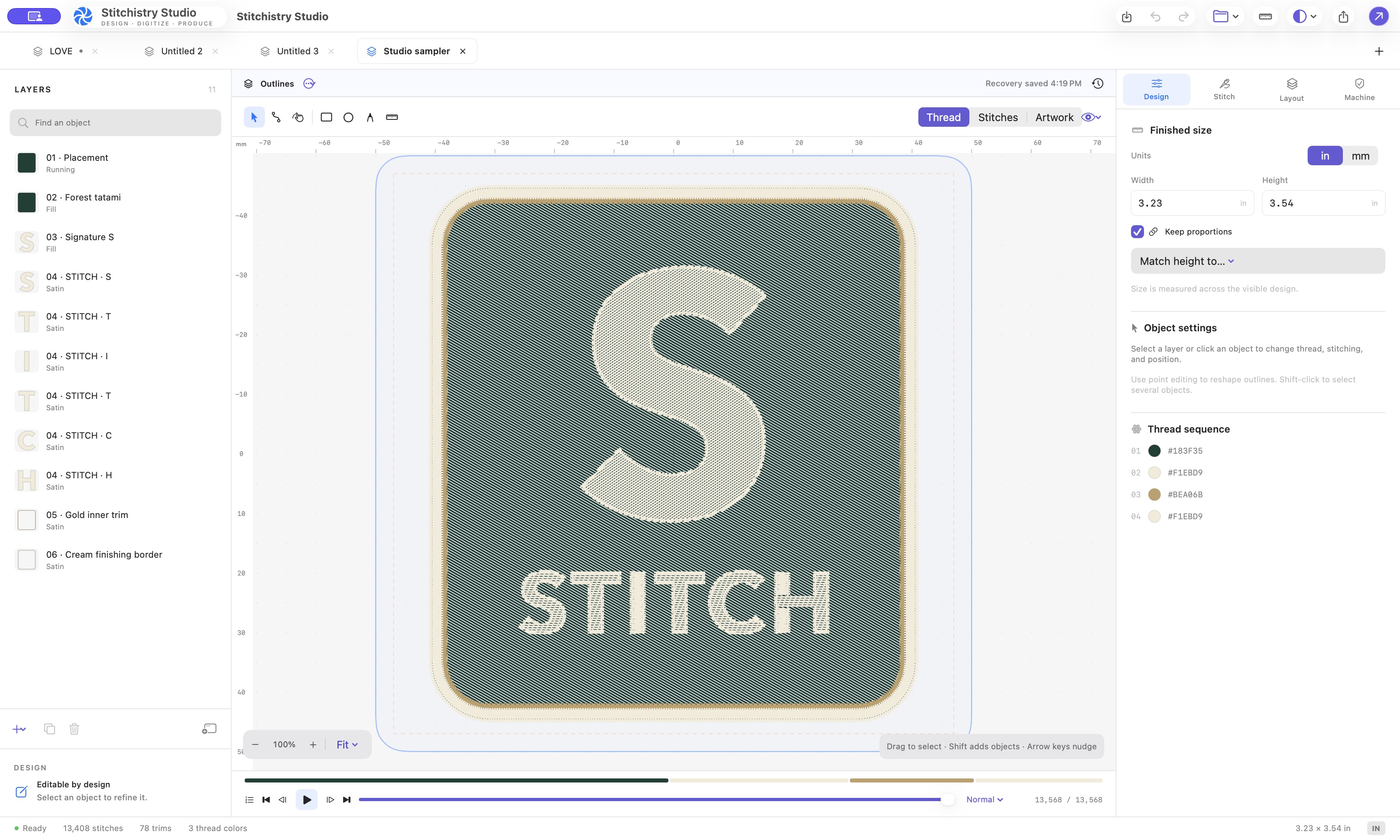
Move between designs in tabs or separate windows. Keep layers, dimensions, thread colors, and the sewing timeline close to the canvas.
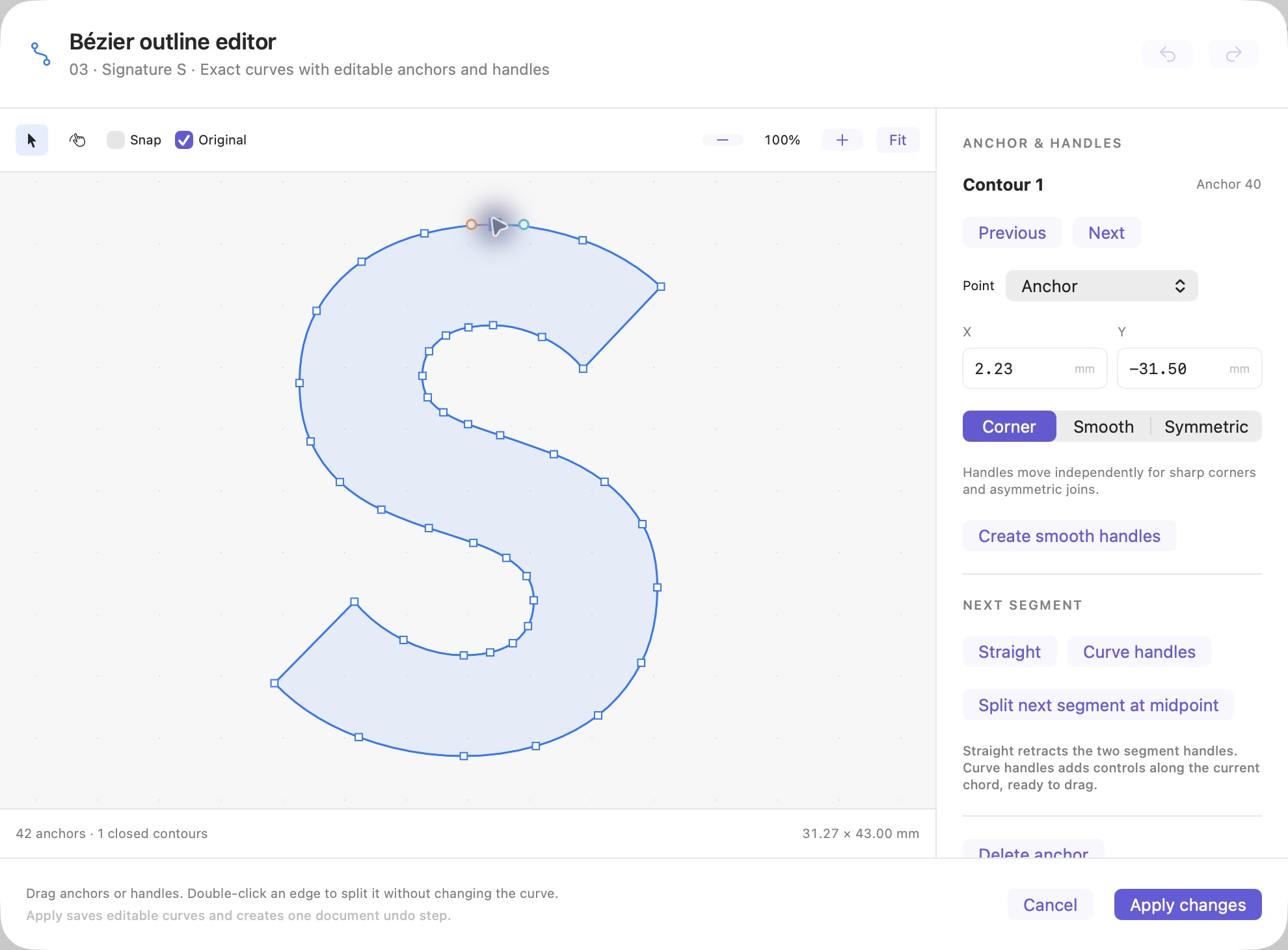
Shape anchors and handles, switch between corner, smooth, and symmetric nodes, or enter precise coordinates. Your curves stay editable in the project.
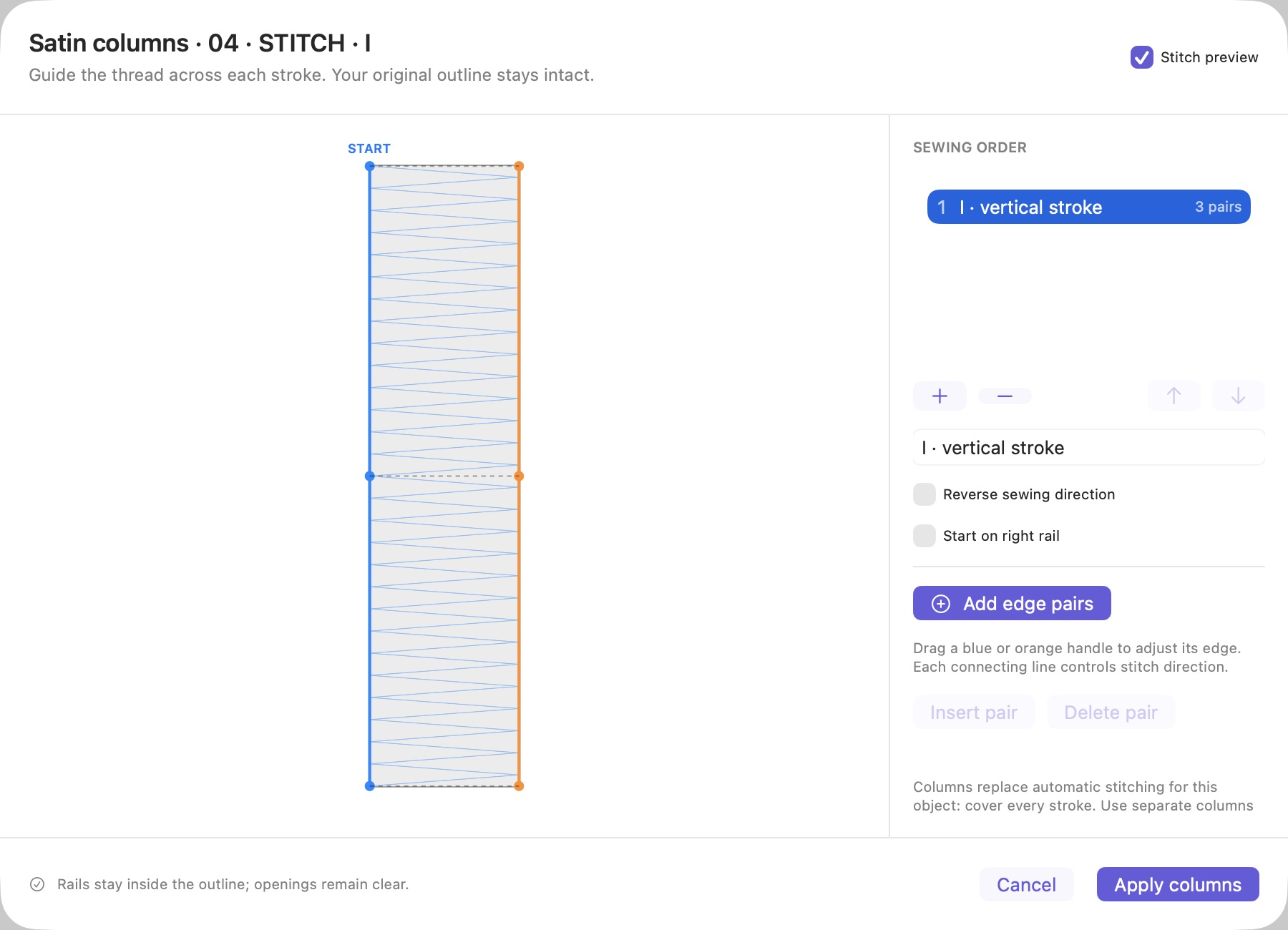
Build satin sections with paired edge points. Adjust their shape, sequence, and direction while retaining the original letter outline—including branched strokes.
TOOLS WITH A PURPOSE.
Expressive lettering. Carefully shaped curves. A finishing border, just so. Make the design you had in mind.
Explore every part of the process.
SEE THE PROCESS.
From a PNG to an editable design, then a reviewed DST export. Watch it happen in the actual Mac app.
Trace a PNG, remove its background, and resize the design with proportions preserved.
Adjust fill settings and Bézier handles, then play the live stitch simulation.
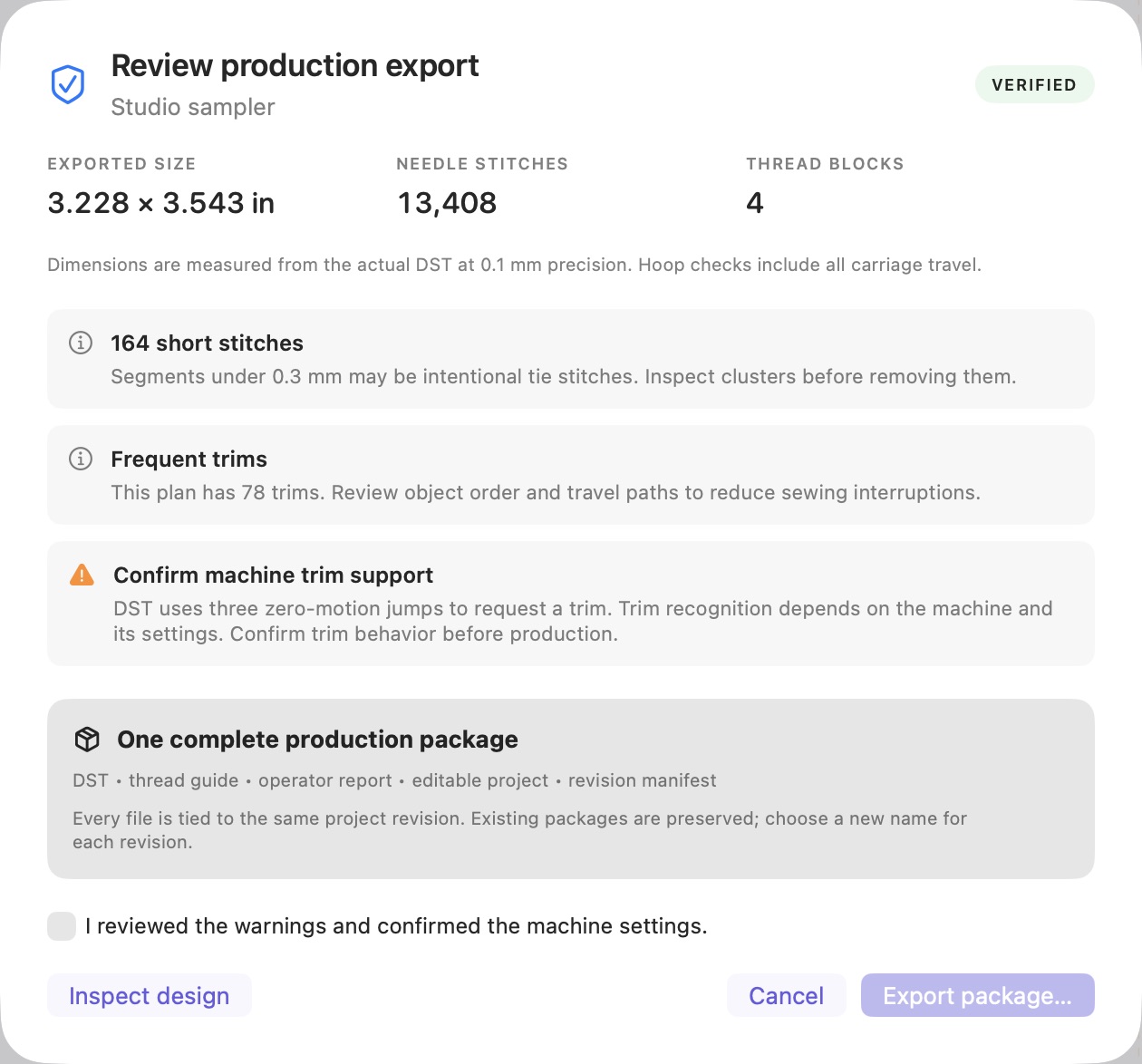
Review dimensions and warnings, export the package, and reopen the DST to inspect its needle commands.
A PNG monogram is imported with its black background removed. The artwork becomes editable embroidery outlines, and the design width is changed from 4 inches to 2 inches with proportions preserved.
The fill angle is set to 45° and the cotton hoodie preset is applied. In the Bézier editor, an anchor is selected, smooth handles are created, and the change is applied. The stitch simulation then plays the sewing sequence, accelerated in this recording.
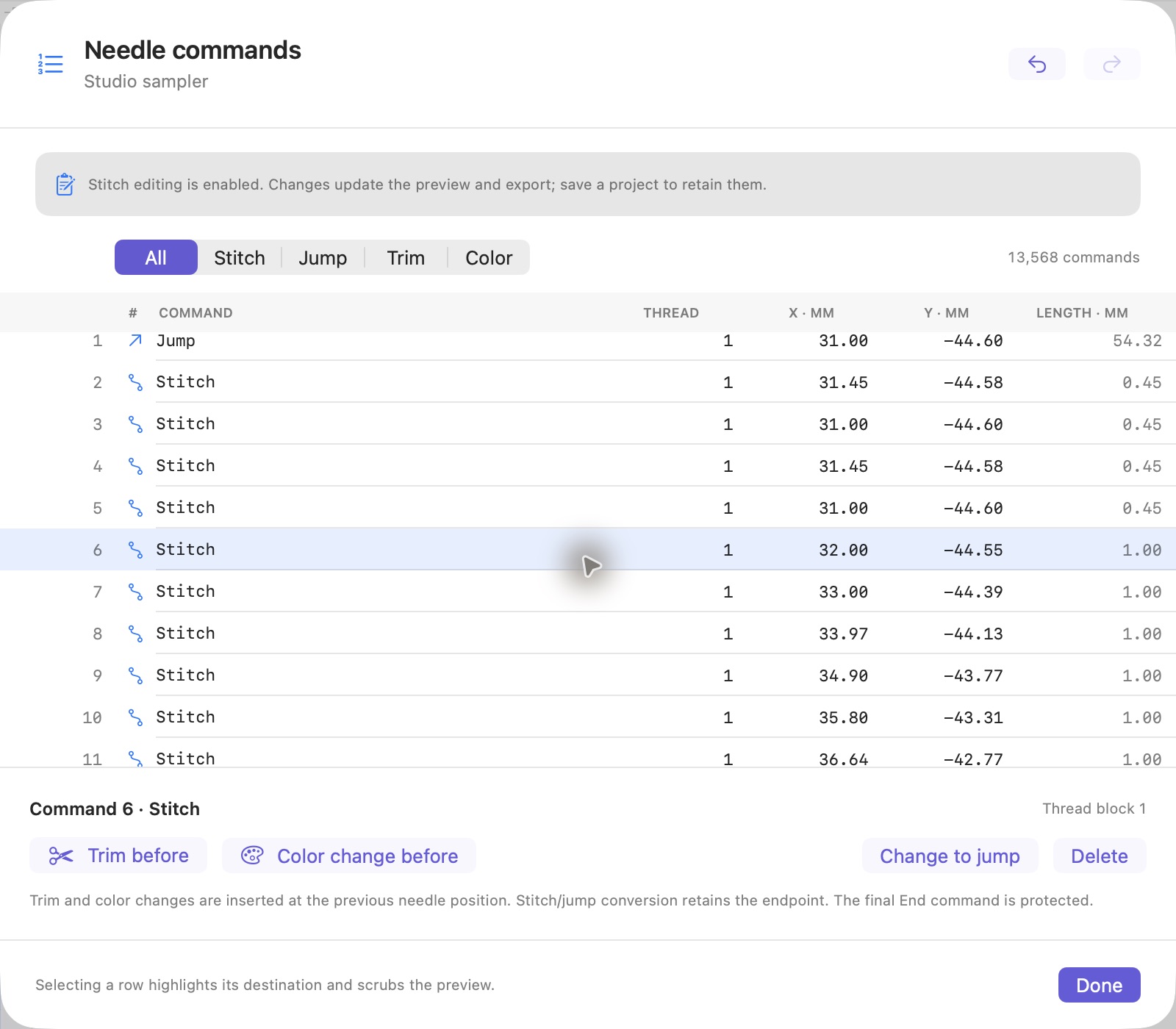
The export review displays dimensions measured from the encoded DST alongside machine warnings. A production package is saved, including the DST and editable project. The exported design.dst file is reopened in Studio, where its individual needle commands can be inspected.
This software demonstration is edited for pace. Test the exported design on your target machine before production.
MAKE ROOM FOR YOUR CRAFT.
Every creative tool, in either plan. Stay flexible with monthly access, or make Studio your own with a perpetual license.
FLEXIBLE BY DESIGN
$10USD / month
Space to create, month after month.
$10 at checkout, then $10 each month until canceled. No trial. Access ends when the paid period ends.
YOURS TO KEEP
ONE-TIME PURCHASE$249USD once
$199 launch price for the first 100 paid perpetual customers; $249 afterward.
Checking launch availability. Your price is confirmed before payment.
UPDATE WHEN YOU’RE READY
When your included updates end, you can keep using eligible Studio releases. Renew update eligibility for another 12 months with a $69 USD one-time purchase whenever you choose.
Renewal is optional and does not repeat automatically. A perpetual license does not guarantee compatibility with future macOS versions.
Manage your licenseAll prices are in USD. Internet is needed for sign-in, activation, purchases and updates. Monthly access requires ongoing verification; activated perpetual licenses work offline with eligible releases. Checkout confirms the plan and total before payment. Read the plan details.
BEFORE YOUR FIRST STITCH
What to know about digitizing, editing, and getting started in Studio.
Yes. Import a PNG, JPEG, HEIC, TIFF, or BMP, trace it into editable outlines, then choose and refine the stitches. Review the dimensions and export Tajima DST for a compatible embroidery machine. The recorded demo shows the full image-to-DST workflow.
You can edit Bézier outlines, satin columns, stitch settings, and individual needle commands. Save the .stitchproject to retain your editable design. A DST contains needle movements; reopening a DST lets you edit its commands, but does not restore the original artwork or outlines.
Studio requires macOS 14 or later and an Apple Silicon Mac. Your design files stay on your Mac. An internet connection is needed for sign-in, activation, purchases and updates. Monthly access requires ongoing verification. Activated perpetual licenses work offline with eligible releases. If monthly access verification expires, editing and export pause; you can still save your projects.
Download Studio and enter your email in the Mac app. Enter the six-digit code there to sign in or create your account. Choose a plan in Studio to open Stripe Checkout in your browser, then return to the app and select Refresh access. Payment and license changes are verified by the service. A website sign-in is optional.
Studio Monthly is $10 USD at checkout and each month until cancellation, with no trial. Studio Perpetual is a one-time purchase: $199 for the first 100 paid perpetual customers, then $249. The perpetual license includes 12 months of updates; the optional update renewal is $69 for another 12 months and never repeats automatically. Launch availability and your actual price are checked before payment. Open Manage billing in Studio, or use your website account, to view billing options. Payments and billing are hosted by Stripe in your browser.
You keep access to the Studio releases covered by your license, including editing and DST export. Newer releases require current update eligibility. Your account provides an eligible download. The optional $69 one-time renewal adds 12 months of updates; it is not a subscription. After activation, eligible perpetual releases can be used offline. Internet access is needed for purchases, updates and managing activations. Future macOS compatibility is not guaranteed.
Yes. Before checkout, explicitly confirm that your monthly subscription should end at its current period end after your perpetual payment succeeds. There is no automatic refund or prorated credit for the remaining monthly period. An unpaid or abandoned checkout does not cancel your subscription. Review the available actions in your account before continuing.
Your machine must support Tajima DST, and the design must fit its hoop and movement limits. Studio checks the encoded file and flags export issues. Test a sew-out on your intended fabric and stabilizer before production; the on-screen preview cannot establish the stitched result.
FROM ARTWORK TO EMBROIDERY
Practical guides to image-to-DST conversion, editing machine files, preserving lettering, and building patches. Explore all guides ↗
Convert PNG and JPG artwork into editable embroidery on Mac. Trace outlines, refine stitches, check the finished size, and export DST with Stitchistry Studio.
Read the guide ↗DST FILE EDITOR FOR MACOpen and edit DST files on Mac. Inspect stitch commands, jumps, trims, and coordinates, simulate the sequence, and review export dimensions in Stitchistry Studio.
Read the guide ↗THE STUDIO GUIDE · LETTERINGLearn how to digitize embroidery lettering while preserving its shape and spacing. Review satin sections, K/G/V details, shared heights, and finished DST size.
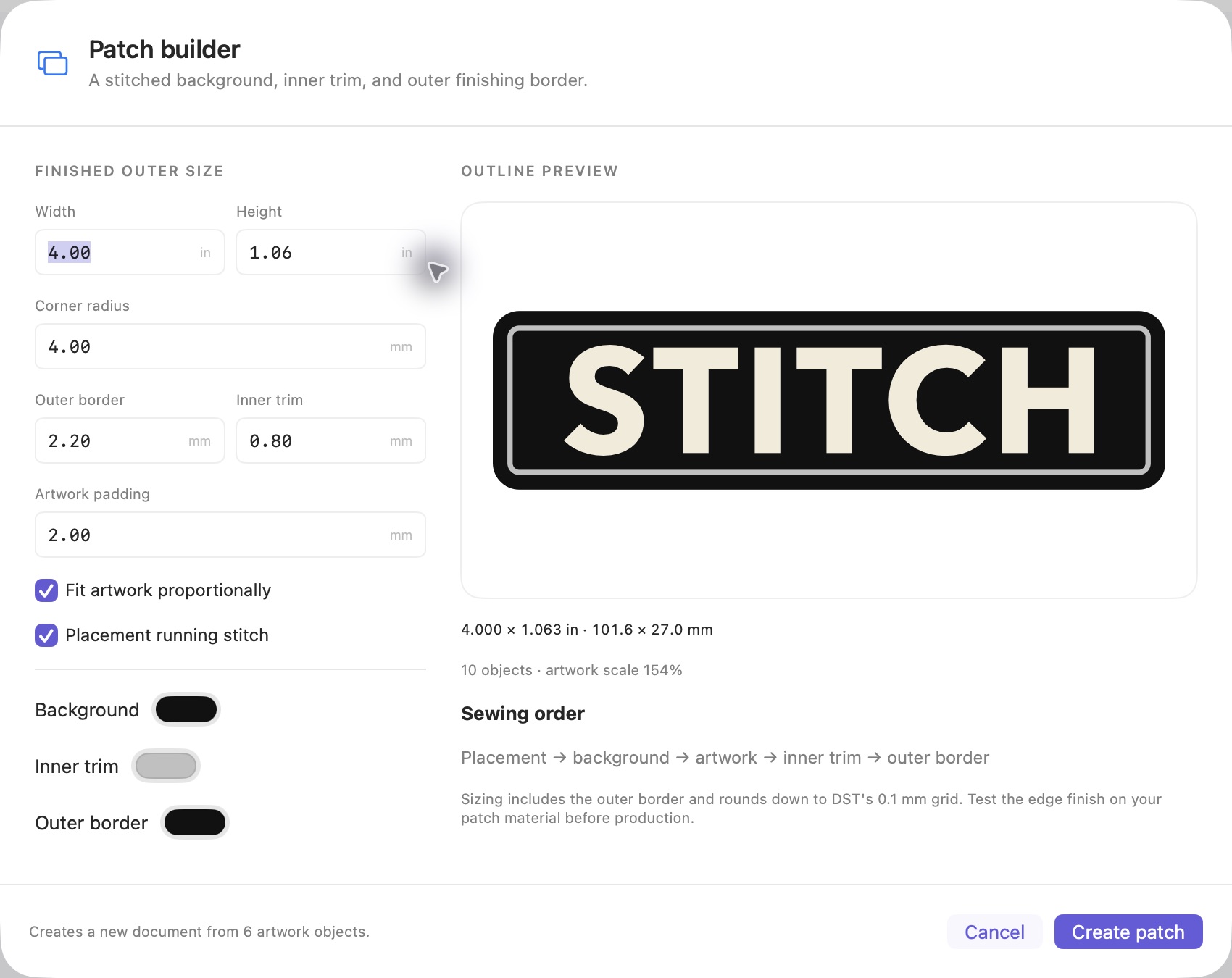
Read the guide ↗THE STUDIO GUIDE · PATCH DESIGNPlan an embroidered patch with a stitched background, inner trim, and outer border. Learn how to size the complete design and review its sewing order in Studio.
Read the guide ↗YOUR NEXT DESIGN STARTS HERE.
A little more precision. A lot more possibility. Download Studio, sign in on your Mac, and choose the plan that suits you.
macOS 14 or later · Apple Silicon
Version 0.7.2 · Build 13
Developer ID signed and notarized for macOS.
ZIP · 4.8 MB · SHA-256 checksum
Signed updates follow your plan’s update eligibility.
Compare monthly and perpetual plans. Signing in does not start a purchase.